
How ERP Software Can Transform Business Operations: From Inventory to Reporting
Running a business means handling hundreds of tasks and decisions every day. The sales team manages customer orders, the inventory team keeps track of stock, finance handles invoices and payments, HR looks after employees, and operations make sure everything runs smoothly. At the same time, management needs accurate reports to understand how the business is performing.
As a business grows, managing all of this through separate spreadsheets, applications, or manual records can quickly become difficult. Information can get scattered across different departments, making it harder for teams to find what they need. Sometimes, one department may have information another team needs, but getting access to it means sending emails, making calls, checking spreadsheets, or entering the same data more than once.
This lack of connection can slow down everyday operations and make it harder for businesses to work efficiently.
This is where ERP software can make a real difference.
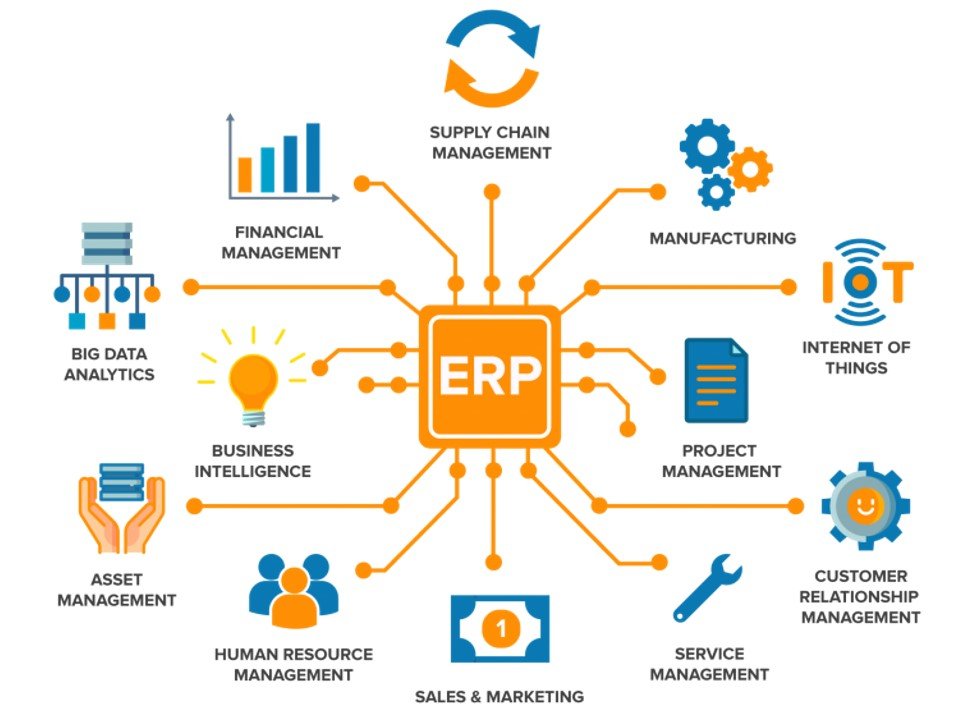
An ERP system brings different business functions together in one connected platform. Instead of managing sales, inventory, purchasing, finance, employee information, and reporting as separate activities, businesses can manage them as connected parts of the same system.
With the right ERP solution, teams can access relevant information more easily, reduce repetitive work, and get a clearer picture of how the business is performing.
What Is ERP Software?
ERP stands for Enterprise Resource Planning.
In simple terms, ERP software is a centralized system that helps businesses manage different parts of their operations from one place. Instead of using separate tools for every department, an ERP connects these processes so that information can move smoothly across the organization.
Depending on the business and its requirements, an ERP system may include modules such as:
- Inventory management
- Sales management
- Purchase management
- Finance and accounting
- Customer management
- Human resources
- Payroll
- Reporting and analytics
- Production management
- Supply chain management
Not every business needs all of these modules. The ERP setup can be customized based on the company’s industry, size, and specific requirements.
At its core, the goal of an ERP system is simple: to connect different parts of the business and create a smooth flow of information across the organization.
The Problem With Disconnected Business Operations
Imagine a company where inventory is managed in one spreadsheet, sales are tracked through a separate application, accounting is handled using different software, and employee information is stored in documents.
Individually, each system might work perfectly fine. The real problem starts when these different systems need to share information with one another.
For example, when a customer purchases a product, several things need to happen. The sales team records the order, the inventory team needs to update the available stock, finance needs the transaction details, and management wants the sale to appear correctly in business reports.
When these processes are handled through disconnected systems, employees often have to move the same information from one place to another manually.
Over time, this can create several challenges, including:
Duplicate data entry
Delays in accessing information
Human errors and incorrect records
Difficulty keeping track of business activities
Inconsistent information across departments
More time spent preparing reports
An ERP system helps solve this problem by connecting these processes within a single system, allowing different departments to work with shared and up-to-date business information.
How ERP Transforms Different Areas of a Business
1. Inventory Management Becomes More Organized
Keeping track of inventory can become challenging as a business grows. When stock information is spread across different spreadsheets or systems, even simple questions can take time to answer.
For example:
How much stock do we have right now?
Which products are running low?
What has already been sold?
Which items need to be reordered?
An ERP system can make this process much easier by keeping inventory information organized in one central place. Businesses can track stock movements, monitor available products, and keep an eye on items that may need to be reordered.
The real advantage comes when inventory is connected with other business processes. When a product is sold, the inventory records can be updated accordingly. Similarly, when new stock is purchased, the relevant inventory information can be updated.
This connected approach can help businesses keep their inventory more organized, reduce manual tracking, and make it easier for teams to know what is happening with their stock.
2. Sales and Purchasing Can Work Together
Sales and purchasing are closely linked. When more customers start buying a product, the business may need to order additional stock to keep up with demand.
Similarly, when inventory levels start falling, the purchasing team needs to know which products need to be replenished and when.
An ERP system can bring these processes together and make it easier for different teams to stay on the same page.
For example, a typical workflow might look like:
Customer Order → Sales Record → Inventory Update → Stock Monitoring → Purchase Requirement
With this connected workflow, information can move between sales, inventory, and purchasing without relying heavily on separate spreadsheets or repeated manual updates.
This can make coordination between departments smoother and help businesses respond more quickly when stock levels or customer demand change.
3. Finance Gets Better Visibility
Financial information plays a central role in every business. From tracking sales and expenses to managing invoices and payments, having accurate financial records is essential for making good business decisions.
An ERP system can connect financial information with other day-to-day business activities. Sales transactions, purchases, expenses, invoices, and payments can all be managed as part of the same connected system.
This makes it easier for management to keep track of important areas such as:
Revenue and income
Business expenses
Sales performance
Outstanding payments
Purchase costs
Overall financial activity
The real benefit of an ERP system isn’t just having more information. It’s having the right information organized and connected, so businesses can understand what is happening and make better decisions based on it.
4. Reporting Becomes Easier
Good business decisions depend on having the right information at the right time. However, preparing reports manually can take a lot of time, especially when information is spread across different departments and systems.
Employees may have to collect data from multiple sources, organize spreadsheets, check figures, and then put everything together into a report. Apart from being time-consuming, this process can also increase the chances of mistakes or outdated information.
An ERP system can help simplify this process by keeping business information in one centralized system. With reporting tools built into the system, management can get a clearer view of different areas of the business, including:
Sales performance
Inventory levels
Business expenses
Purchases
Revenue
Employee activity
Overall operational performance
Instead of spending hours putting reports together manually, teams can work with organized business data and access the information they need more easily.
The result is less time spent compiling reports and more time spent understanding the business and making informed decisions.
5. HR and Employee Management Can Be Centralized
ERP systems aren’t limited to sales, inventory, or finance. Depending on the solution and the needs of the business, they can also help organizations manage various employee-related processes.
For example, an ERP system may include features for:
Employee records
Attendance tracking
Leave management
Departments and roles
Payroll
Employee-related reports
Without a centralized system, employee information can end up scattered across spreadsheets, documents, and different applications. Finding or updating the right information can then become unnecessarily time-consuming.
With an ERP system, businesses can keep relevant employee information organized in one place, making it easier for HR teams and management to access, update, and manage employee-related data.
6. Automation Reduces Repetitive Work
One of the biggest advantages of modern ERP systems is their ability to automate routine and repetitive tasks.
For example:
Sale completed → Inventory automatically updated
Invoice generated → Financial record updated
Stock reaches a certain level → Reorder notification triggered
Leave request submitted → Manager notified
With these automated workflows, employees don’t have to spend as much time on repetitive updates or manually transferring information from one system to another.
The goal of automation isn’t to replace people. It’s to reduce unnecessary repetitive work, so employees can spend more time focusing on tasks that require their attention, experience, and decision-making.
7. ERP Helps Different Departments Work Together
A business doesn’t really operate as a collection of completely separate departments. What happens in one area often has a direct impact on another.
For example, a sale affects inventory. Changes in inventory can create new purchasing requirements. Purchases affect financial records, and financial information helps management make better business decisions. Those decisions, in turn, influence day-to-day operations.
ERP software helps bring these connected processes together within one system.
Instead of each department maintaining its own separate records, teams can work with shared and connected information. This can make communication easier, reduce unnecessary manual work, and give the business a clearer picture of how different activities work together.
In simple terms, ERP helps different parts of a business work as one connected system rather than as isolated departments.
Custom ERP vs One-Size-Fits-All Software
Every business has its own way of working. The processes that work for a logistics company may be completely different from those used by a restaurant. Similarly, a school, retail store, rental business, or manufacturing company may all have very different operational requirements.
Because of these differences, a standard ERP solution may not always fit a business perfectly. Some organizations may need specific features or workflows that aren’t available in an off-the-shelf system.
This is where custom ERP development can be useful.
A custom ERP solution can be designed around the way a business actually operates, including:
Business processes
Industry-specific requirements
User roles and permissions
Approval workflows
Reports and dashboards
Third-party integrations
Automation requirements
Data structure
The idea isn’t to force a business to completely change the way it works just to fit a piece of software. Custom ERP development allows the software to be built around the business’s actual needs and workflows.
What Makes a Good ERP System?
A good ERP system isn’t necessarily the one with the longest list of features. What really matters is whether it can solve the business’s actual problems and make everyday operations easier.
When choosing an ERP solution, businesses should consider a few important factors:
Scalability
As the business grows, the ERP should be able to grow with it without becoming a limitation.
Usability
The system should be simple enough for employees to understand and use comfortably in their day-to-day work.
Security
Business data needs to be protected. Proper user access controls and security practices can help keep sensitive information safe.
Integration
The ERP should be able to connect with other systems or tools the business already uses when necessary.
Reporting
Management should be able to access clear and useful reports that help them understand business performance and make informed decisions.
Customization
Every business has its own requirements. A good ERP should offer enough flexibility to accommodate important business-specific processes.
Support
Implementing an ERP is not the end of the process. Regular maintenance, updates, and reliable technical support are important for keeping the system running smoothly over time.
Ultimately, the best ERP is one that fits the business, supports its people, and continues to provide value as the organization grows.
When Should a Business Consider ERP Software?
There isn’t a fixed business size or a specific point at which every company needs an ERP system. The right time depends on how the business operates and the challenges its teams are facing.
However, there are certain signs that a business may be ready for a more connected and organized system.
ERP may be worth considering if your business:
Depends heavily on spreadsheets for daily operations
Has different departments working with separate systems
Frequently enters the same information multiple times
Finds it difficult to keep track of inventory
Spends a lot of time preparing reports manually
Experiences communication gaps between departments
Is growing quickly and becoming harder to manage
Wants to automate repetitive tasks
Needs business information available in one central place
One simple way to look at it is this: if your employees are spending more time managing and searching for information than actually using it to get work done, it may be time to rethink the technology supporting your business.
How to Implement an ERP System Successfully
ERP implementation should be treated as a business project rather than simply installing a new piece of software. The goal is to make sure the system actually supports the way the business works.
Step 1: Understand Business Requirements
Start by looking at the current processes and identifying where the business is facing problems, delays, or unnecessary manual work.
Step 2: Decide Which Modules Are Needed
Not every business needs every ERP feature. Identify the areas where an ERP system can provide the most value, such as:
Inventory
Sales
Finance
HR
Purchasing
Reporting
Step 3: Plan the Workflows
Once the requirements are clear, map out how information should move between different departments and processes.
Step 4: Develop or Configure the ERP
The system can then be developed or configured based on the business requirements and workflows identified earlier.
Step 5: Test Everything
Before going live, test important workflows, data, user permissions, integrations, and reports to make sure everything works as expected.
Step 6: Train the Team
Employees need to know how to use the new system and understand how it will fit into their everyday work. Proper training can make the transition much smoother.
Step 7: Monitor and Improve
ERP implementation doesn’t end once the system goes live. Businesses should continue monitoring how the system performs, collecting feedback, and making improvements whenever needed.
A successful ERP implementation is not just about deploying software. It’s about creating a system that genuinely makes the business more organized, connected, and efficient.
ERP Is More Than Software
It’s easy to think of ERP as just another software application that a business installs and starts using. But in reality, successful ERP implementation is about much more than technology. It’s about understanding how the business actually works.
The technology provides the platform, while the business provides the processes, people, and workflows. When these elements are designed to work together, an ERP system can become a valuable tool for improving efficiency and keeping different parts of the organization connected.
That’s why businesses shouldn’t start by asking:
“Which ERP has the most features?”
A better starting point is:
“What problems do we need our ERP to solve?”
Once those problems are clear, it becomes much easier to choose or build an ERP solution that genuinely fits the business.
How Soft Infox Can Help
Soft Infox provides technology solutions that are designed around the specific needs of businesses. Its services include ERP development and custom software development, along with application and website development, AI integration, cloud solutions, frontend and backend development, database solutions, and DevOps and deployment.
The company also offers business-focused solutions for areas such as inventory management, school management, logistics, rental management, restaurant management, and UAE Freezone data management.
For businesses that are still relying on disconnected systems and manual processes, a customized ERP approach can bring different operations together in a more organized and connected digital environment.
Instead of forcing every business to follow the same workflow, the right ERP solution can be built around how the organization actually works—helping teams manage information more efficiently and stay better connected.
The Future of Business Management Is Connected
Businesses are becoming more digital every day. But digital transformation isn’t just about replacing paperwork with software or moving existing processes online.
The bigger opportunity is to connect the different parts of the business.
When sales, inventory, finance, HR, operations, and reporting can work together and share information, businesses can get a much clearer picture of what’s happening across the organization.
ERP software provides a strong foundation for this connected approach. It can bring different processes together, reduce unnecessary manual work, and make information easier to access.
As businesses continue to adopt automation, cloud technology, and AI, ERP systems are also evolving. They are moving beyond basic business management and becoming more intelligent, connected platforms that can support businesses as they grow.
In the future, ERP won’t just be about managing business processes,It will be about helping businesses work smarter, respond faster, and make better decisions.
FAQ's
What is ERP software?
ERP software is an integrated business management system that connects different functions such as sales, inventory, purchasing, finance, HR, and reporting.
How does ERP improve business operations?
ERP can centralize information, automate repetitive processes, improve coordination between departments, and make business data easier to access and analyze.
What are the main modules of an ERP system?
Common ERP modules include inventory, sales, purchasing, finance, HR, customer management, reporting, and operations. The modules can vary depending on business requirements.
Is custom ERP better than standard ERP software?
It depends on the business. Standard ERP can work well for organizations with common workflows, while custom ERP can be useful when a business has specialized processes or requires specific integrations and functionality.
Can ERP automate business processes?
Yes. ERP systems can automate workflows such as inventory updates, invoice generation, notifications, approvals, and other repetitive processes, depending on the system’s configuration.
Is ERP suitable for small and medium-sized businesses?
Yes. ERP solutions can be designed or selected according to the size, complexity, budget, and growth plans of a business.
How long does ERP implementation take?
There is no fixed timeline. Implementation depends on the number of modules, level of customization, integrations, data migration, testing, training, and overall project complexity.